Quick answer: this is a scam
If you got an email saying your bank account has been locked, suspended, or placed on hold and it is asking you to click something or verify your details, do not click anything. This is almost certainly a scam. Real banks do not work this way.
What is actually going on here
You open your email and there it is. Your bank's logo at the top, an urgent message telling you your account has been suspended, and a big button asking you to verify your details or review your account. Your stomach drops a little. You think, what if this is real?
That feeling is exactly what the scammer is counting on.
These emails are designed by people who have spent a lot of time studying how real bank emails look. They copy the logo, the colours, the layout, sometimes even the footer text. At first glance they can look convincing. But they are sent to millions of people at random, most of whom do not even have an account with the bank being impersonated. The scammer does not know who you bank with. They are just hoping the name matches.
While the examples below show Bank of America emails, this exact scam runs using every major bank in every country. In Canada you will see it using RBC, TD, CIBC, BMO, and Scotiabank. In the UK it targets Barclays, HSBC, Lloyds, and NatWest. In Barbados, Sagicor, Republic Bank, and FirstCaribbean are regularly impersonated. The bank name changes. Everything else stays exactly the same.
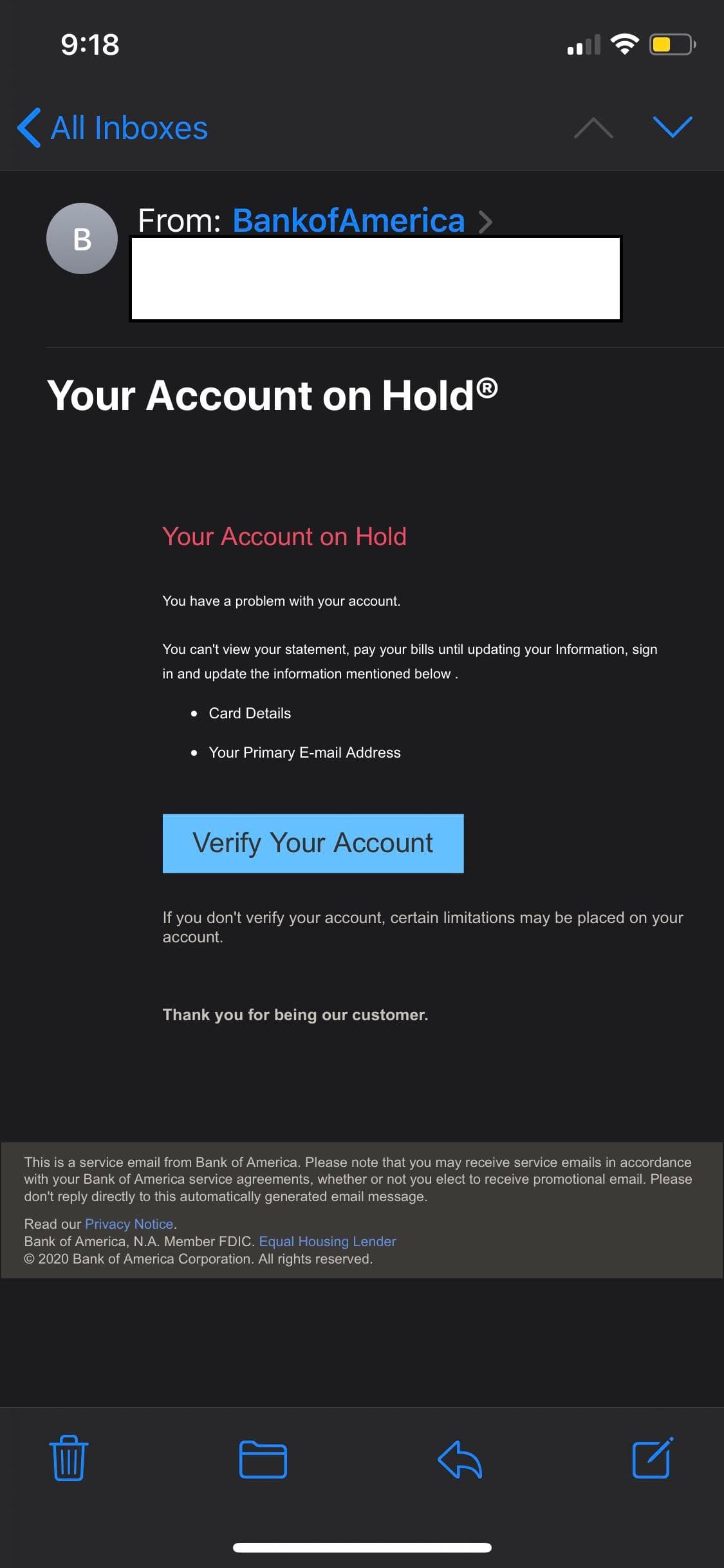
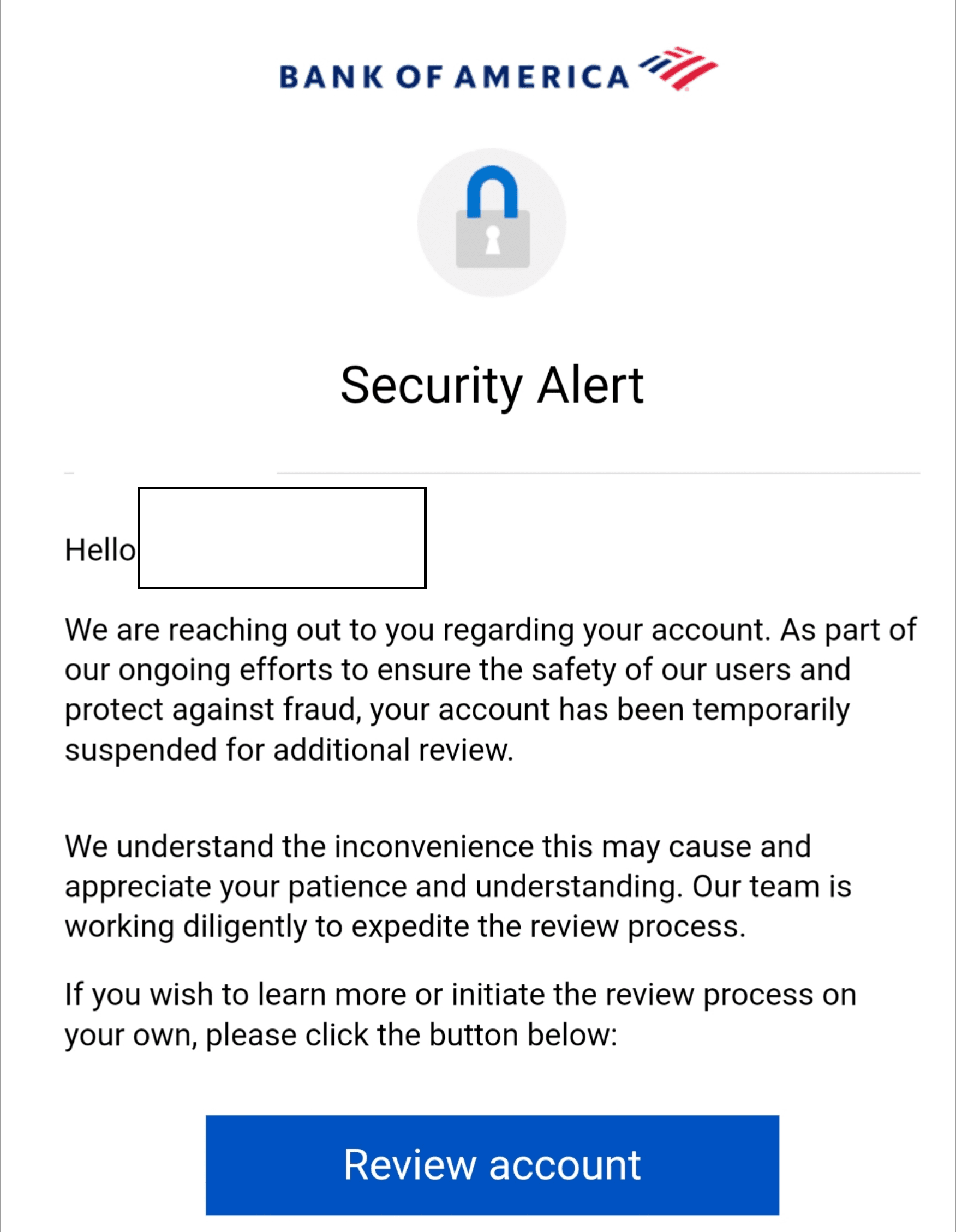
How to spot it: the things that give it away
Once you know what to look for these emails become easy to spot. Here are the signs that appear in almost every fake bank security alert.
There is no name. Real banks always address you by your full name. They have it on file. A message that opens with just "Hello" or leaves a blank space where your name should be was not written for you personally. It was written for nobody in particular and sent to millions of inboxes at once.
The problem is deliberately vague. Look at the language in these examples. "You have a problem with your account." "Your account has been temporarily suspended for additional review." There is no explanation of what actually happened, no transaction reference, no specific date. That vagueness is intentional. A real bank would tell you exactly what triggered the alert. Scammers keep it vague because they have no idea what is actually in your account.
It wants you to click a button. Both of these emails push you toward a button as the solution. Review account. Verify your account. That button does not go to your bank's website. It goes to a fake page built to look like your bank's login screen, and anything you type into it goes straight to the scammer.
It is asking for sensitive information. The second example is particularly brazen. It explicitly asks for card details and your email address. No bank will ever ask you to provide your card number, PIN, or password by clicking a link in an email. That is simply not how banking security works.
It is trying to scare you into acting fast. "If you don't verify your account, certain limitations may be placed on your account." That is a threat and it is there for a reason. A frightened person acts quickly. A person who acts quickly does not stop to check whether the email is genuine. Scammers know this and they rely on it.
The formatting feels slightly off. If you look closely at the second example the text is inconsistent, the phrasing is awkward in places, and the overall presentation does not quite match what you would expect from a professional financial institution. Real bank communications go through multiple rounds of review before they are sent. These do not.
What Phltr found
When we uploaded both screenshots to Phltr using the Screenshot tab on phltr.net, Phltr read the visible text and content from each image and flagged both as likely scams within seconds.
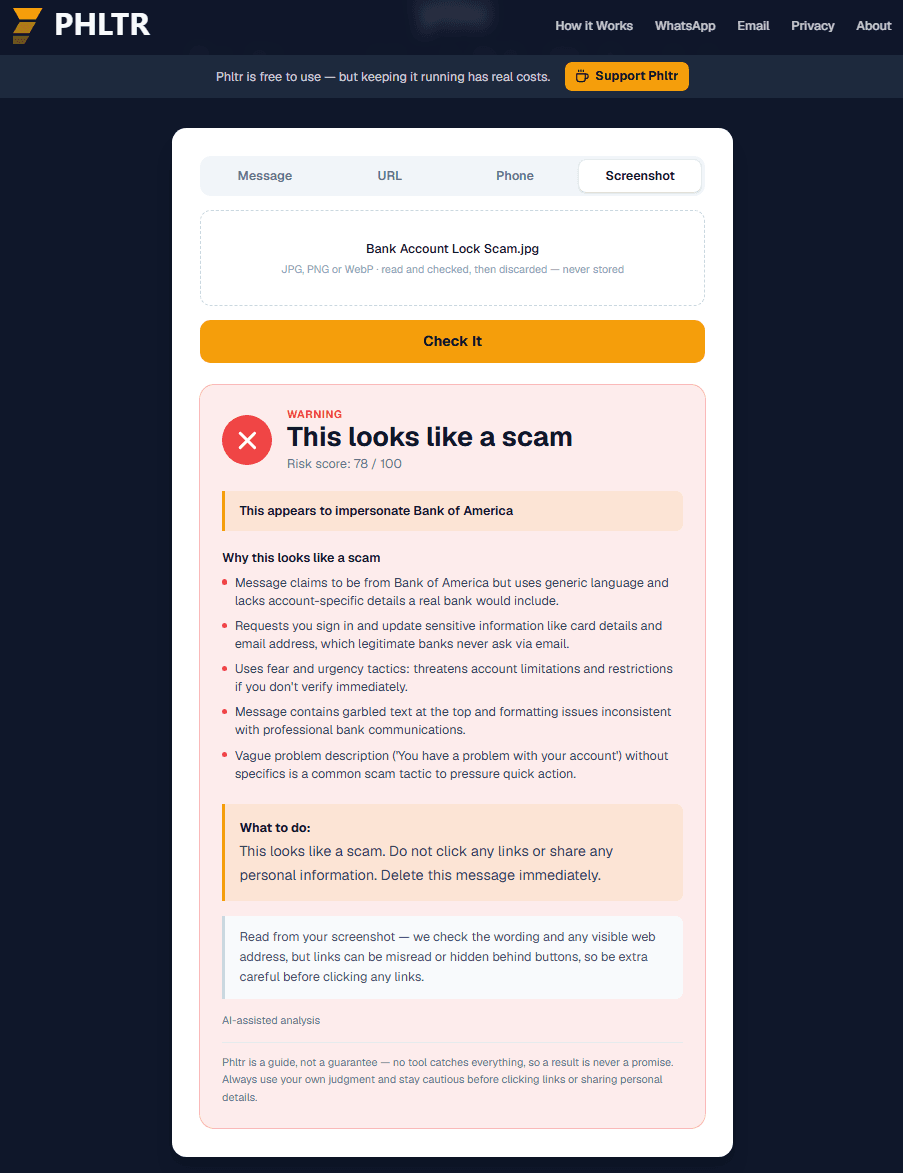
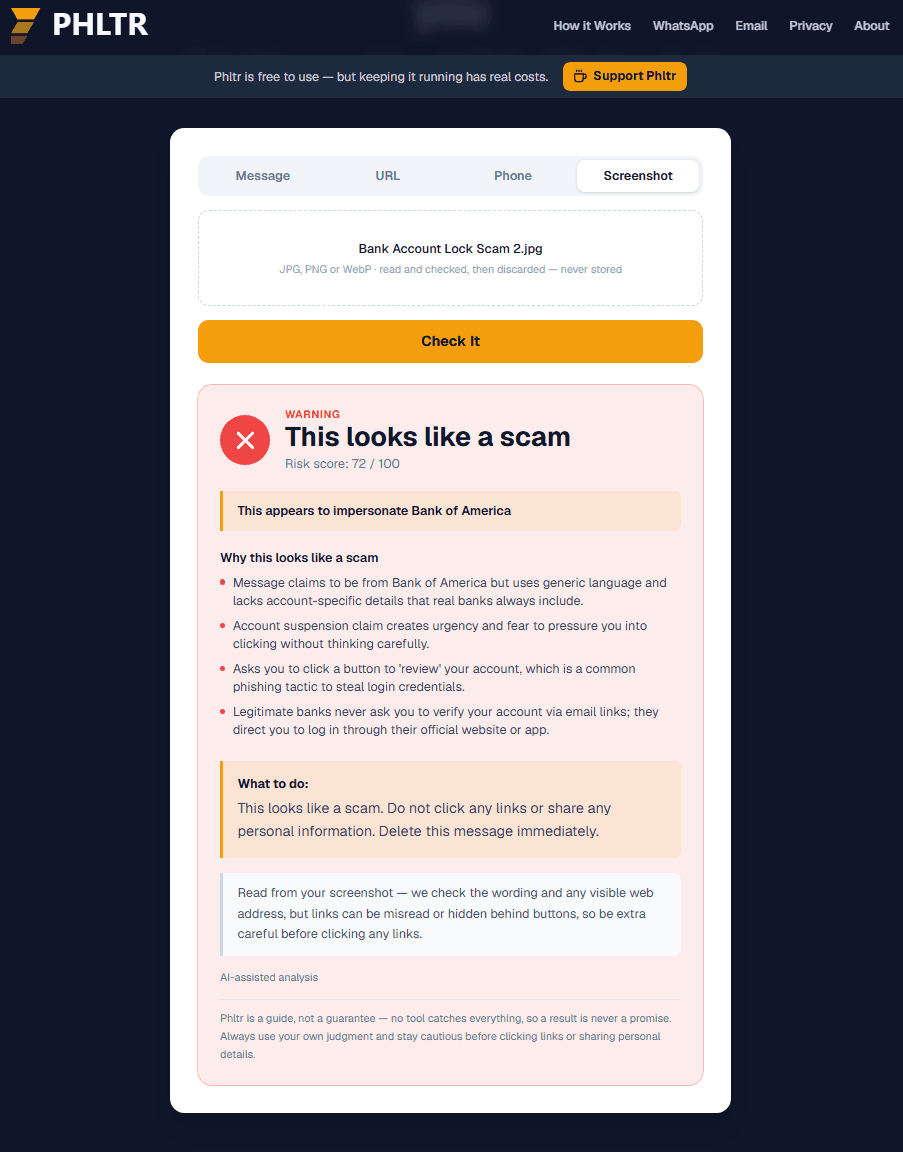
If you have a suspicious email open right now you can take a screenshot of it and upload it directly to phltr.net. You do not need to click any links or copy any text. Just screenshot it and let Phltr read it for you.
What your real bank actually does
It helps to know what genuine communication from your bank looks like so you can tell the difference immediately.
What the real thing looks like
Your real bank will always use your full name. It will tell you exactly what triggered a security alert, whether that is a specific transaction, a login from an unfamiliar device, or a password change request. It will never ask you to provide your PIN, full password, or card number through a link in an email. If it needs you to do something it will direct you to open its app or type its website address directly into your browser, never through a link in an email. It will also be able to confirm any genuine issue when you call the number printed on the back of your card. And its emails will always come from its official domain, something like yourbank.com or yourbank.co.uk, never from a free email service or a slightly different address like yourbank-secure.com.
Not sure about an email you received? Check it here.
If something landed in your inbox and you are not sure whether it is genuine, paste the text below or upload a screenshot. Phltr will check it instantly and tell you what it found.
What to do if you already clicked
If you clicked something or entered information before reading this, do not panic but do act quickly. The sooner you respond the better the outcome.
If you entered your online banking password, call your bank immediately using the number on the back of your card. Tell them what happened and ask them to lock your online banking while you sort it out. They deal with this every day and they will help you.
If you entered your card number or PIN, call your bank and ask them to cancel the card and send you a replacement. Check your recent transactions for anything unfamiliar and report anything suspicious to your bank straight away.
If you only clicked the link but did not type anything, you are probably fine. Change your banking password as a precaution and keep an eye on your account over the next few days. Some phishing pages attempt to install software on your device when you visit them so it is also worth running a security scan.
If you are genuinely not sure what you did, call your bank and explain what happened. There is no need to be embarrassed. This happens to a huge number of people and your bank would far rather hear from you early than deal with the consequences of you staying silent.
Where to report it
Reporting the scam will not undo what happened but it genuinely helps protect other people. Fraud reports feed into databases that security researchers and law enforcement use to track and shut down these operations.
- Canada
- Report to the Canadian Anti-Fraud Centre at reportascam.ca or by calling 1-888-495-8501. You can also forward the email to your bank's dedicated fraud address.
- United Kingdom
- Report to Action Fraud at actionfraud.police.uk or by calling 0300 123 2040. Forward suspicious emails to report@phishing.gov.uk.
- United States
- Report to the FTC at reportfraud.ftc.gov and forward the email to reportphishing@apwg.org.
- Barbados
- Contact the Royal Barbados Police Force at your local station or reach the Cybercrime Unit directly. You can also report to your bank's fraud team.
- Anywhere else
- Whatever country you are in, forwarding the suspicious email to your bank's fraud team is always a good step. Most major banks have a dedicated phishing address listed on their official website.
Questions people ask about these emails
My bank's logo is in the email. Doesn't that mean it is real?
Unfortunately no. Copying a logo takes about ten seconds. Scammers download the exact logo, fonts, and colour scheme directly from a real bank's website and drop them straight into a fake email. A logo is not proof of anything.
The sender address looks like it is from my bank. Is it still a scam?
It can be. Email sender addresses can be manipulated to display whatever name or address the sender wants. Tap or click on the sender's name to reveal the actual email address it came from. If it is anything other than the bank's official domain treat it as suspicious and do not click anything.
I actually have an account with this bank. Does that make it more likely to be real?
Not really. These emails go out to enormous lists of addresses. Some recipients will have accounts with that bank and some will not. The scam is designed to work on both. People with accounts worry theirs is affected. People without sometimes click out of curiosity or confusion.
What if the email says my account will be closed if I do not act?
This is one of the most common tactics in bank phishing emails. Before you do anything else, call the number on the back of your bank card and ask whether there is genuinely an issue with your account. In almost every case there will not be. Hearing that directly from your bank is the fastest way to know for certain whether the email was real.
How do I find out what my bank's real email address looks like?
Log into your banking app or website directly by typing the address yourself rather than clicking any link. Check your inbox within the app for previous genuine messages. You can also call your bank and ask them to confirm what email addresses they send from.