Quick answer: this is a scam
If you received an email or text claiming to be from your tax agency about a refund, a payment, or a problem with your return, and it is asking you to click a link, provide personal information, or submit documents, it is almost certainly a scam. Tax agencies do not initiate contact this way. Do not click anything.
Why tax agency scams are so effective
There are a few topics that reliably make people anxious enough to act without thinking. Money they are owed is one. Money they might owe is another. Tax agencies sit right at the intersection of both, which is why scammers have been impersonating them for decades and show no sign of stopping.
A message that says your tax refund is waiting triggers immediate interest. A message that says there is a problem with your return triggers immediate concern. Either way the instinct is to engage with it quickly. Scammers design these messages to exploit exactly that reaction.
While the examples in this guide show messages impersonating the IRS, this same type of scam runs in every country using every major tax authority. In Canada scammers impersonate the Canada Revenue Agency, often called the CRA. In the UK they impersonate HMRC. In Barbados they impersonate the Barbados Revenue Authority. The agency name and the specific amounts change. The tactics, the pressure, and the red flags are identical everywhere.
Example one: the fake tax refund email
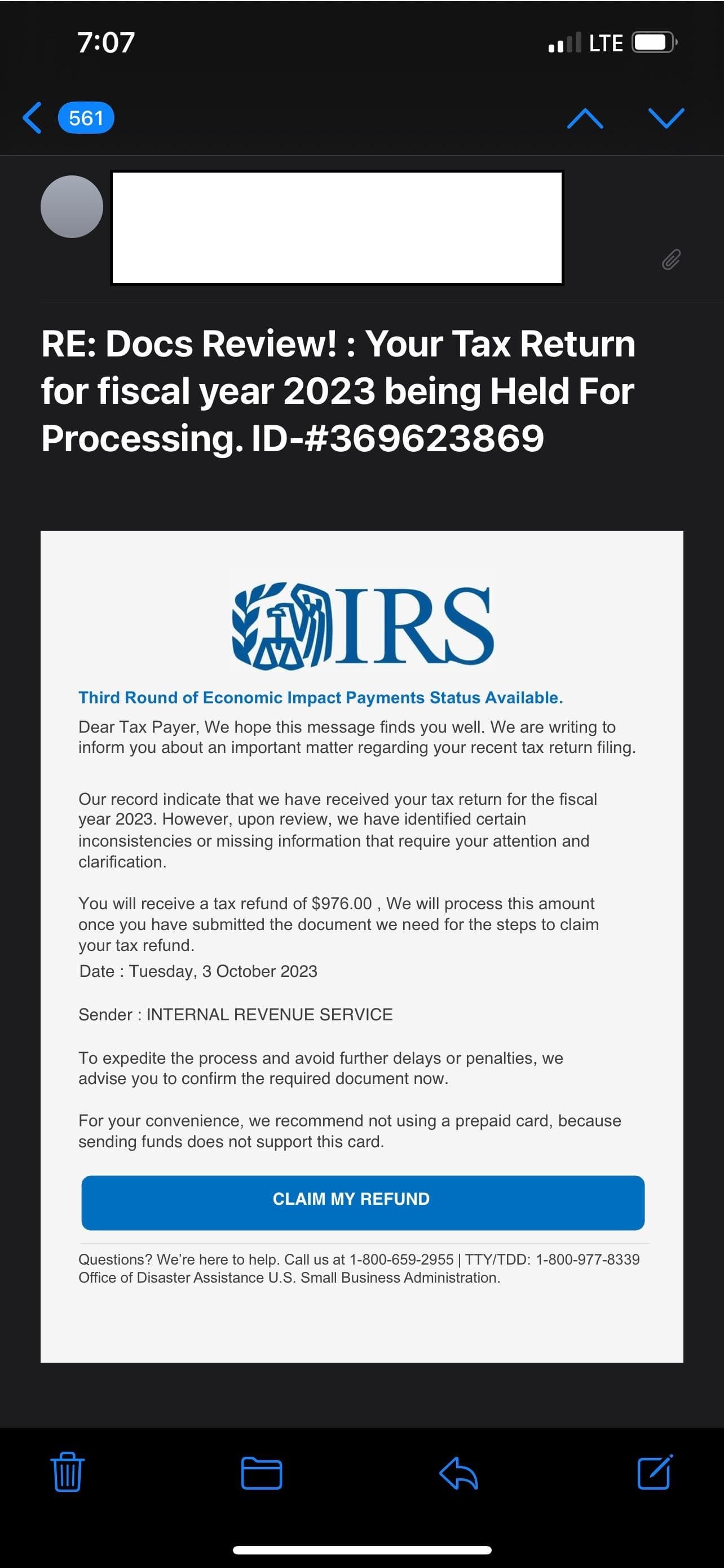
This email tries hard to look official. It has the IRS logo, a reference number in the subject line, and a professional layout at first glance. But several things immediately betray it as a scam.
The subject line is the first tell. Real government correspondence has clear, formal subject lines. This one reads "RE: Docs Review! : Your Tax Return for fiscal year 2023 being Held For Processing" with inconsistent capitalisation, an exclamation mark, and punctuation errors that no government agency would send out in an official communication.
The greeting is another immediate signal. "Dear Tax Payer" with no name. The IRS knows your name. Any genuine correspondence from your tax agency will address you by your full legal name as it appears on your filing. A generic greeting means this was sent to millions of people who may or may not have ever filed a tax return in the United States.
The footer is where this one really falls apart. Look at the bottom of the email. The contact details credit the Office of Disaster Assistance at the U.S. Small Business Administration. That is a completely different government agency. The IRS and the Small Business Administration are separate organisations. A genuine IRS email would never carry contact details for an unrelated agency. This inconsistency is a strong sign that whoever assembled this message did not think it through carefully.
The language is also engineered to create pressure. "To expedite the process and avoid further delays or penalties" is a threat wrapped in bureaucratic phrasing. There are no delays or penalties to avoid. There is no refund waiting. The only thing clicking that button would do is take you to a page designed to collect your personal information.
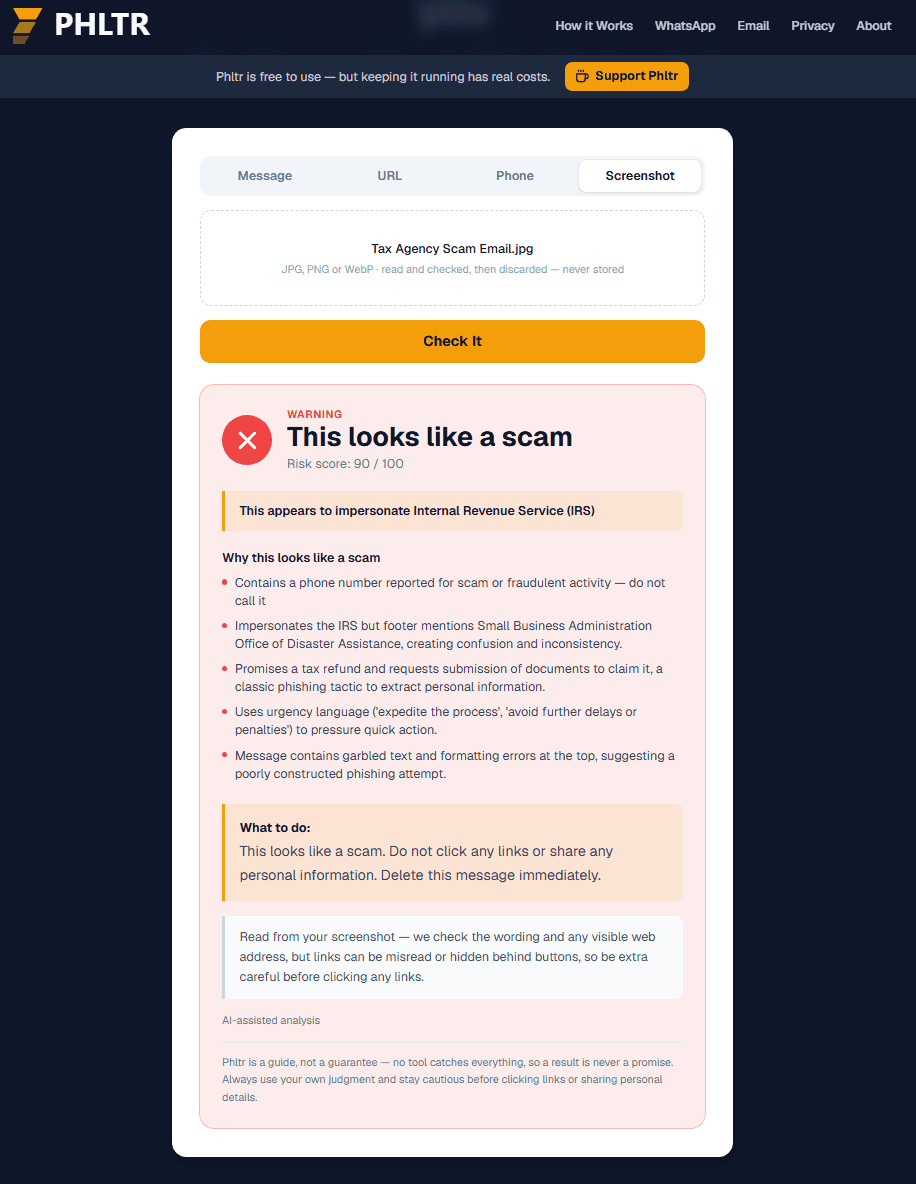
Example two: the fake stimulus payment text
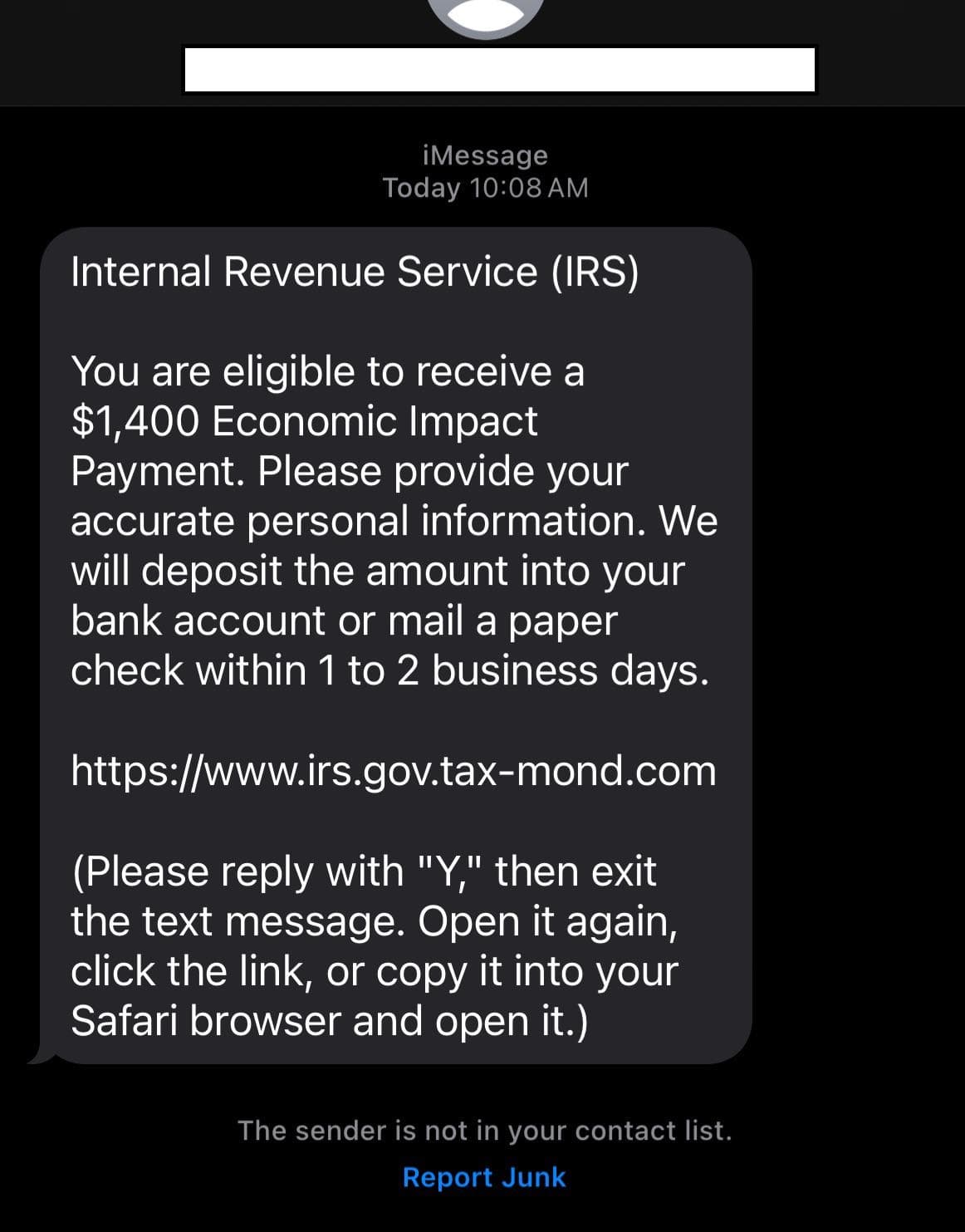
This text message is a particularly instructive example because it uses two deceptive techniques worth understanding in detail.
The first is the link itself. At first glance it looks like it starts with irs.gov, which is the real IRS website. But look at the full address: irs.gov.tax-mond.com. The actual domain here is tax-mond.com. Everything before the final dot before the first forward slash is just a subdomain, and anyone can create a subdomain that contains any words they want including irs.gov. The real destination of this link has nothing to do with the IRS. This technique is called subdomain spoofing and it is one of the most effective ways scammers make links look legitimate at a glance.
The second technique is the set of instructions at the end of the message. It asks you to reply with Y, then exit the message, open it again, and either click the link or copy it to Safari. This is the same bypass tactic we saw in the package tracking scam guide. Some security features on phones flag or block direct taps on suspicious links. Asking you to copy and paste the link manually attempts to get around those protections. No legitimate organisation asks you to follow these kinds of steps to access their website.
The IRS also does not text people about Economic Impact Payments or stimulus eligibility. The IRS communicates primarily by post. It does not send texts asking you to provide personal information to receive a payment.
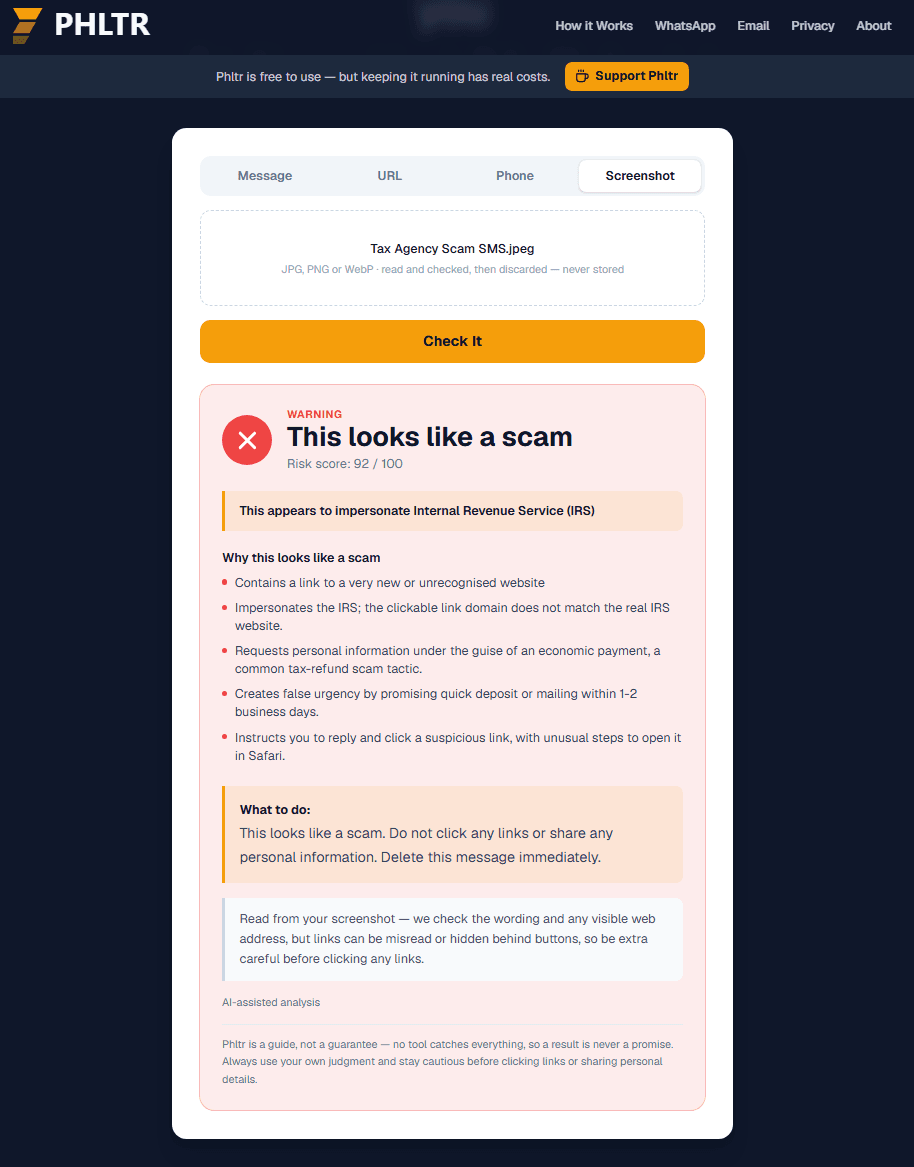
Understanding subdomain spoofing
Because it appears in the SMS example above and in several other scams, it is worth taking a moment to explain how subdomain spoofing works so you can spot it anywhere.
Every website address has a main domain: the part that comes just before the first forward slash. For irs.gov that main domain is irs.gov. For canadapost.ca it is canadapost.ca. For royalmail.com it is royalmail.com.
Anything that comes before the main domain is a subdomain, and subdomains can be set to anything by whoever owns the main domain. So while irs.gov belongs to the real IRS, someone who owns tax-mond.com can create a subdomain called irs.gov and end up with the address irs.gov.tax-mond.com. It looks like it starts with the real website. It does not.
The rule to remember is simple. Find the part of a web address that comes just before the first forward slash and just after the last full stop before that slash. That is the real domain. Everything else is decoration that anyone can set to anything they want.
What real tax agencies actually do
What the real thing looks like
Real tax agencies contact you primarily by post, not by email or text message. When they do send email it goes to an address you registered with them and it addresses you by your full legal name. They never ask you to click a link to claim a refund or provide personal information through a message you did not initiate. They do not create artificial urgency about penalties or delays in communications about refunds. If you are owed a refund it will be processed through the normal channels you set up when you filed, and you will receive official correspondence by post confirming it. If you are ever unsure whether something from a tax agency is genuine, log in to your account directly through the official website by typing the address yourself, or call the number listed on your official tax documents.
Check a suspicious tax message right now
If you received something that claims to be from a tax agency and you are not sure whether it is genuine, check it here before clicking anything.
What to do if you already clicked or provided information
If you clicked a link but did not enter any information, close the page immediately and do not return to it. Run a security scan on your device as a precaution.
If you entered personal information such as your name, address, date of birth, or tax identification number, contact your tax agency directly using contact details from their official website. Explain what happened and ask what steps you should take. You may also want to place a fraud alert on your credit file as a precaution since personal tax information can be used in identity theft.
If you entered banking details or made a payment, contact your bank immediately. Ask them to cancel any affected cards and monitor your account for suspicious transactions. Report the incident to your bank's fraud team.
If you replied to the text with Y or any other response, your number is now confirmed as active. Be especially cautious about follow-up communications in the coming days and do not engage with messages from unknown numbers.
A note on genuine tax agency contact
If you are ever genuinely unsure whether a tax agency has tried to contact you, there is a straightforward way to find out. Do not use any link, phone number, or email address provided in the message you received. Instead go directly to the tax agency's official website by typing the address yourself and log in to your account there. Any genuine notices or correspondence will be available in your account. If nothing appears there you can be confident the message was not from them.
You can also call the tax agency on a number you find through their official website or on your official tax documents. Do not call any number provided in a suspicious message.
Where to report it
- Canada
- Report to the Canadian Anti-Fraud Centre at reportascam.ca or by calling 1-888-495-8501. You can also report CRA impersonation directly to the CRA through canada.ca.
- United Kingdom
- Report HMRC impersonation to HMRC directly by forwarding suspicious emails to phishing@hmrc.gov.uk and suspicious texts to 60599. You can also report to Action Fraud at actionfraud.police.uk.
- United States
- Report IRS impersonation to the Treasury Inspector General at tigta.gov or by calling 1-800-366-4484. Forward suspicious emails to phishing@irs.gov. Report to the FTC at reportfraud.ftc.gov.
- Barbados
- Report to the Royal Barbados Police Force or contact the Barbados Revenue Authority directly through their official website to report impersonation. Contact the Cybercrime Unit for digital fraud.
- Anywhere else
- Tax agencies in most countries have dedicated fraud reporting channels specifically for impersonation scams. Reporting helps them track active campaigns and warn other taxpayers.
Questions people ask about tax agency scams
I did file a tax return recently. Could this be about my real return?
It is very unlikely to be connected. Tax agencies do not follow up on returns through unsolicited texts or emails asking you to click links or provide information. Any genuine query about your return would come by post addressed to you by name with a reference number you can verify through your official account. If you are genuinely concerned about your return, log in to your tax account directly using the official website.
The email had a reference number. Doesn't that mean it is official?
No. Scammers include reference numbers specifically to make messages look official. A number in an email proves nothing about where it came from. What matters is the sender's actual email address, whether the email addresses you by your full name, and whether clicking any links takes you to the agency's real domain.
The link seemed to start with irs.gov. Isn't that the real website?
This is subdomain spoofing, explained in detail earlier in this guide. The real domain is the part just before the first forward slash. In irs.gov.tax-mond.com the real domain is tax-mond.com, not irs.gov. The IRS's actual website is simply irs.gov with nothing after it before the forward slash.
My tax agency has emailed me before. How do I tell the difference?
Check the exact sending address, not just the display name. Look at whether the email uses your full legal name. Check whether any links go to the agency's real domain. And ask yourself whether the email is asking you to do something the agency has never asked you to do before, like submit documents through a link to claim a refund. If something feels off, log in to your account directly rather than engaging with the email.
Should I call the number in the email to verify it?
No. Phone numbers in scam emails and texts are either fake or belong to the scammer. Calling them puts you in contact with the scammer rather than the real agency. Always find contact numbers through the agency's official website or your official tax documents.